Tag Archives: 7.5.3

Odd Startup Disk Behaviour

Odd Startup Disk Behaviour

Update – I’ve since discovered that this behaviour is improved if you put newer drivers on the disk. This sounds obvious, but in most instances, if you format the disk in an older version of Mac OS, and then try to update the driver, it doesn’t work because there isn’t sufficient free space for a larger driver (I believe, let me know if I’m misunderstood). The crude and destructive way of fixing this is to delete the first data partition, create a small 1 or 2MB partition straight after the driver partition, then recreate the data partition. At this point, delete the small partition and you’re left with a little gap. If everything works out, updating the driver will use this gap and will actually work. I… haven’t done this in a little while, so I can’t remember if it is best to use one of the versions of Drive Setup that supports 68k macs, or the last version of Apple HD SC Setup.

Original Post

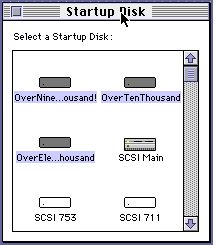
I’ve found that when I put a large (9GB), more modern SCSI hard disk in some of my older 68k Macs, they stopped allowing me to individually select boot partitions in the Startup Disk control panel. This is extremely frustrating as it limits you to only booting from the first partition of each installed disk, even though your desktop is full of smaller partitions.
Startup Disk

The issue most obviously manifests when you find that if you open the Startup Disk control panel and pick a partition, closing and reopening the control panel shows all partitions on that disk as selected, and when you restart, the computer just boots from the first partition on the disk.

I haven’t worked out exactly what causes it, it may be due to my choice of partition size, or just the model of disk, but, regardless, I have found a workaround that doesn’t involve using the elderly utility “System Picker”.

I’ve found that for some reason, this issue goes away (although the the all partitions selected in the control panel remains) in Mac OS 8, and more interestingly, if you copy the Startup Disk control panel from Mac OS 8 onto other systems (I just copied it to the desktop, it doesn’t need to actually be installed), you can boot from any partition!

Useful to know.

If you don’t have a copy of Mac OS 8 or similar available, here is a copy from Mac OS 8.1 :

http://elephantandchicken.co.uk/downloads/Startup%20Disk.sit.hqx
IDE to SD Quickstart

IDE to SD Quickstart

The following guide is designed to get up and running quickly with a IDE to SD adapter when you don’t have any installed OS on your antique IDE (aka ATA) Macintosh such as the Quadra 630, Macintosh 6500 or Beige G3.

The following are required :

  • An IDE to SD adapter board
  • A copy of the program Etcher
  • An SD card of at least 4GB
  • An elderly Macintosh with an IDE interface (laptop or desktop)
  • A modern computer (MacOS X, Linux or Windows)
  • Time

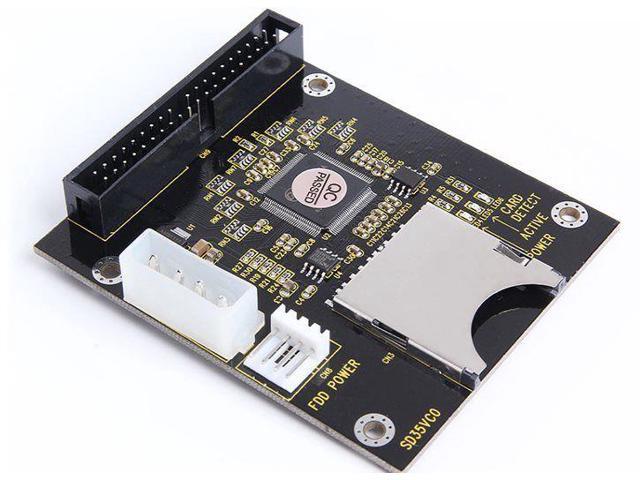
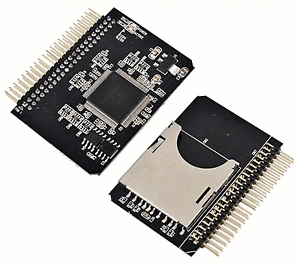
I have two different types of IDE to SD adapter, although I’ve only used the smaller type as I use one in my Powerbook. The first example has a smaller laptop style connector. The second has a full size IDE connector. If you get the laptop variant, you can get adapters for your adapter. I have had issues with the second type in my beige G3 (with a Rev A ROM). Weirdly, even though they’re on independent buses, it behaves better if I unplug the CD-ROM drive. Early G3 (beige and iMac) appears to be… sensitive.

New Secure Digital 44 Pin 2.5" Male IDE To SD Card Adapter Amiga 600 1200  #100 | eBay
3.5" 40Pin 40-Pin Male IDE To SD/SDHC/MMC memory Card SD to 3.5 IDE Adapter  - Newegg.com

Download the following disk image onto your modern computer. This contains both a 2GB “Restore” partition with a bootable copy of Mac OS 8.1, installation disk images for Mac OS 7.1.2 to 8.1 and some utilities etc. to make life easier, as well as a second, empty, 2GB partition for you to install a second OS if you please.

ATA Version of 8.1 Plus Installers and Utilities (~600MB download)

Unzip the disk image in the download and save it somewhere handy, such as the desktop.

Install Etcher, insert your SD card into the modern computer, launch Etcher and follow instructions to select the downloaded disk image and your target SD card. Take care – you don’t want to flash it to your computer’s hard disk!

Once the card is written, eject it from your modern computer. Place it in the IDE to SD card adapter and insert it into your retro Macintosh.

That should be it – you should be able to boot from the disk. You’ll need to add additional partitions if you want to use the rest of your SD card if it is bigger than these partitions (~1.9GB), but I’m not sure what the best software is for this with an IDE disk – probably HDT or similar.

The following is a previous, much smaller image which I made in the past. I haven’t had a chance to test it myself as I have been working on a G3 which wont boot 7.5.3, so feedback would be appreciated. This disk image can work with a minimum SD Card size of 2GB.

ATA Version of 7.5.3 Restore, plus Macintosh SD 7.6.1 partition (~59MB download)