An Extremely Tardy Performa 6200 Review…
… or how slow is the “worst Mac” when you actually spend some time gathering primary evidence, including experimenting with various tools to improve performance over day-one reviews.
Draft Notes
I haven’t fully finished this article because my 6200 stopped working. This notes section just captures a few thoughts I was having and that I wanted to test or investigate. I’ve left it here so I can come back to it once I repair the 6200.
Impact of cache speed? None between 14 and 15ns. Suggests that both are faster than the computer. Interesting to see a) what happens with a 40MHz bus. b) what happens with a 22ns cache.
Impact of using AV card. Seems slower than built in, certainly with G3. I personally can only test without logic board cache if the G3 is installed. CPU runs faster with AV card, even without the cache, which is amazing. Suspect AV + Cache (I can’t test because I don’t have a basic riser) would be pretty good.
Availability of processor upgrades.
Current prices.
Why is quickdraw so slow on the 6200. Confirmed that video is faster on 630. 56.6 vs. 43.8 best case 8.6, or 42.9 for Mac OS 7.6.1.
MDK isn’t that different.
While 68k emulated FP isn’t great, remember this is a replacement 630… Most of which didn’t have a hardware FPU. Performance is ~2.4 times better without tweaks in 7.6.1.
What is the measured difference in performance running different ROM versions?
Forward
Before continuing, please realise that the topic covered on this page is strangely contentious within the retro Mac community and I am very aware of this, to the degree that I have at times hesitated working on and publishing this analysis.
Please understand that I have done my absolute best to approach this as scientifically as possible. I’m not pro or anti Performa 6200, but please, when providing any input or discussion, be mindful a small number of points…
- Please be kind in your criticism. I’m only human.
- I have spent literal weeks undertaking benchmarks of dozens of configurations as well as reviewing technical documentation – if you don’t agree with something, please explain the whys and the hows. To meet the required level of rigor to update this page, I will need you to provide reproducible hard data that I can run on my own machine.
- Any contradiction of previous publications is not intended as a personal slight.
Summary
When executing PowerPC code, the Performa 6200 is 21.1% slower than the Power Macintosh 6100/66 in terms of CPU performance, and about 66.8% slower in graphics performance. Memory throughput is likely the main CPU bottleneck with PM 6100/66 RAM being 52.6% faster. The IDE hard disk performance is good, achieving sustained reads and writes of up to 2.19MB/s and 2.66MB/s respectively, with a fresh Mac OS 7.6.1 install and a slightly newer than stock IDE disk, possibly from a Performa 6300 based on the size and age. The best disk speeds achieved by the Performa 6200 were 2.42 MB/s read and 2.77 MB/s write, surprisingly in emulated 68k mode with SpeedDoubler enabled. The SCSI disk in the PM 6100 SCSI did outperform the IDE disk with 3.68 MB/s read and 3.64 MB/s write with a fresh Mac OS 7.6.1 install, but the disk was borrowed from a newer, high-end system. The best (non-G3 accelerated) PM 6100 disk scores seen were 3.76 MB/s read and 3.82 MB/s write. The Performa 6200’s FPU performance is impressively good, scoring about 30% faster than the PM 6100/66 overall.
There is little difference in emulated 68k performance between the Performa 6200 and the PM 6100/66, with the former scoring 12.5% and the latter 15%, both relative to the benchmark tool’s baseline system (a PM 6100/60) running PowerPC code. While this shows the Performa 6200 is 16.7% slower than the 6100/66, in reality both are only the speed of a 68030 processor + 68882 and the gap is small in absolute terms. More interestingly the gap in performance of emulated 68k mode closes compared to the gap in performance while running PowerPC native code (21.1% for PPC, vs 16.7% for Emulated 68k as indicated above). This suggests that the impact of the smaller Level 1 cache in the PowerPC 603 is not as significant for emulated 68k performance in Mac OS 7.6.1 as has previously been stated. This is an extremely interesting result.
With the exception of graphics performance, the Performa 6200 is faster than any 68k Mac when running PPC code, and by using SpeedDoubler, can be made to be faster than any 68k Mac when running 68k code in emulation, again, excluding graphics performance.
Overall, the biggest issue with the Performa 6200 is the graphics performance and not the 68k emulator performance.
The performance benefits of MathLibMoto and PowerFPU are small, with PowerFPU causing a small reduction in performance in some scenarios.
Background
Apple released the Performa 6200 family as a PowerPC based replacement for the Performa 630 family. I’m going to ignore all the various versions they released as they’re all basically the same machine other than the 6290, which had a better (603e @ 100MHz) CPU.
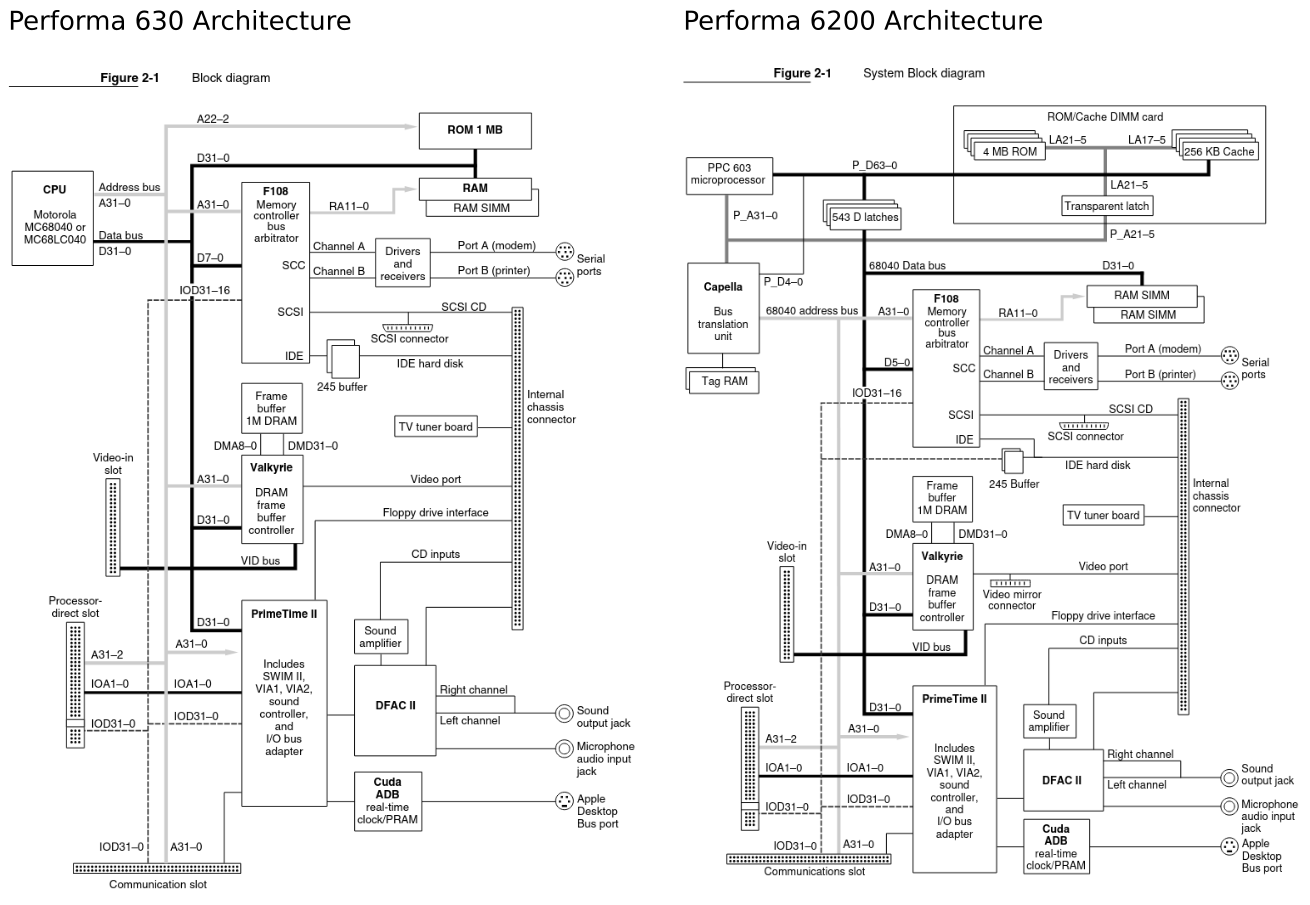
The Performa 6200 shares it’s chipset with the Performa 630 so completely, that the sound, memory controller, video chip, I/O chip, and more are all identical parts. Technically, the Performa 6200 could be thought of as a Performa 630 with a PowerPC 603 upgrade card soldered to the logic board. So much so that a clue in plain “view” is the startup sound – it matches the one used on the DayStar and Apple PowerPC upgrade cards for various 68k Macs.
While a bottom-end machine at the time, the Performa 630 is an excellent 68k Mac. They are fast, even for a 33MHz 68040, they can be upgraded to have an FPU if you don’t already have the Quadra variant (which came with one), and can be easily overclocked to 40MHz. The various upgrade slots and hardware video scaling make it a fun consumer AV machine, especially if you can find the AV card and the less common hardware MPEG decoding card. An Infra-Red remote, UHF module, and a UHF + FM module were also available. Note that all of these various add-ons work with the Performa 6200, and all parts other than the logic board are functionally identical (case, PSU, etc). Swapping 630 and 6200 boards (as well as 6300 family boards other than the 6360) is trivial.
Apple also released Performa 580, Performa 5200, Performa 5300 machines and equivalents, which are effectively the same computers, but with a built in monitor. Anything on this page discussing the 630, 6200 or 6300 families equally applies to the 580, 5200 and 5300 families respectively.
The Performa 6200 shipped with a 75MHz PowerPC 603 processor. The ROM and L2 cache are connected directly to the processor by a high speed 64bit bus. A bridge chip named “Capella” then connects this PPC 64bit bus to a Performa 630 style 32bit 68040 bus at 37.5MHz. The 040 bus connects to the RAM, the video chip, serial, SCSI and IDE, while the sound, ADB, RTC and floppy are attached to a slower 68030 style bus (16MHz, 32bit) from the “PrimeTime II” I/O controller.
When released, the Performa 6200 received scathing reviews, with particular attention paid to its poor performance when running emulated 68k software. The opinion of these machines has been cemented by a number of online articles describing them as the worst Mac ever, which sadly contain a number of factual inaccuracies. The often stated primary issue when emulating 68k code relates to how the 603 processor uses a separate 8k each for Level 1 data and instruction cache, which was apparently insufficiently large to run the 68k emulator efficiently. This begs the question, given as time went on more and more code was released for PPC and the OS itself was heavily optimised for PPC (speed critical 68k code was replaced to improve performance), does the machine retrospectively deserve its reputation?
One factor that likely caused the poor reaction to the Performa 6200’s performance is the processor speed in MHz. While the Performa 6200 has a numerically superior “speed” compared to the 6100/60 and 6100/66, benchmark scores were lower even for PowerPC native code. I suspect this was the first time a higher clock speed Mac performed worse than an older machine with a lower clock speed (although the IIvx comes close, perhaps that deserves a similar retrospective). Obviously this isn’t an issue in reality, but could cause false expectations. Considering this, it is worth keeping in mind that I think the Performa 6200 cost less in real terms than the 6100. The Performa 6200 was $2300 with a monitor, keyboard and software, while the 6100 was $1700 without either a keyboard or monitor. Although more analysis of prices is required.
I got curious and have been watching for a Performa 6200 of my own. I recently found one at a bargain price and so this post is my investigation and findings. My aim is to provide an unbiased opinion on the performance, but also, to find how the most can be achieved with the machine, and what benefits can be found from various mitigation tools such as…
- Newer OS versions
- SpeedDoubler
- PowerFPU
- MathLibMoto
Comparison will be primarily made with the Power Macintosh 6100/66, as this is a machine that the 6200 is commonly compared with and I have one for collecting my own benchmarks.
Test Machine Specifications
Performa 6200 Specification
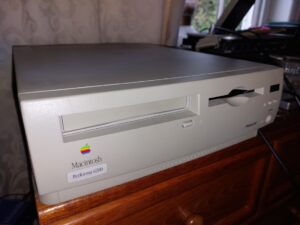
The following specification describes my individual Performa. It is pretty much stock, other than the RAM, hard disk, OS versions and ethernet card.
- Bezel label says “Performa 6200”.
- British sold machine from the Cork, Ireland factory, built in the 15th week of 1995.
- Doesn’t have the bad “not a recall” ROM, or the bad video chip (early machines had stability issues).
- 75MHz PPC 603 CPU with 8k data and 8k instruction L1 cache.
- 256k L2 on 64bit bus (I assume at 37.5MHz, but see “Cache Speed”).
- 64MB of RAM, operated with 80ns timings (regardless of speed fitted) and 32bit.
- A 1.2GB IDE “spinning rust” Quantum brand hard disk. Apple marked, but from 1996, so likely taken from a 6300 or similar.
- CD-ROM Drive (4x Matshita CR-8005 drive, original Apple supplied).
- Apple 10baseT CommSlot Ethernet card (thank you Sophie Rose!).
- Stock “manual inject” “SuperDrive” floppy drive. Not sure what brand as I haven’t removed it (it is working well).
- Dual booting Mac OS 7.6.1 and Mac OS 8.6.
The power supply needs recapping, it is a little noisy and turns the computer on by itself.
Power Macintosh 6100/66 Specification
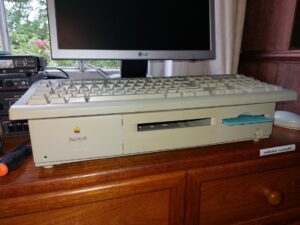
For reference in the context of benchmarks, the following specifications describe my specific PM 6100/66. I did my best to revert it to stock, other than the RAM, OS versions and hard disk.
- Bezel label missing, should say “Power Macintosh 6100/66. I suspect the lid is from a Quadra 610 as it has “Macintosh” silkscreened on it, instead of “Power Macintosh”.
- Weird Frankenstein’s monster of a machine, logic board from the 49th week of 1995, blatant Centris case from 1993 and a logic board serial number factory of “GY” which apparently isn’t a valid factory code.
- 66MHz PPC 601 CPU with 32k combined instruction and data cache.
- 256k 64bit L2 cache fitted, 15ns part on a 33MHz bus.
- 264MB of RAM on 64bit bus. Operated with 80ns timings.
- A 4GB SCSI hard disk, originally shipped with a 9600. Not stock speed.
- No CD-ROM fitted (it stopped working).
- Stock “manual inject” “SuperDrive” floppy drive.
- Booting 7.6.1 only for comparison.
Advantages / Disadvantages
The following is a list of features of each computer that aren’t purely architectural.
Performa 6200
- + Three expansion slots, Comm Slot, LC “PDS”, and the video slot for the video input card.
- + Support for UHF / FM.
- + Infrared receiver.
- + Case volume buttons
- + IDE for cheaper modern CF, SD and M.2 hard disk solutions.
- – Only 8bit, 22kHz sound.
- – RAM capped at 64MB
Power Macintosh 6100/66
- + Ability to fit 7″ NuBus card.
- + Ability to fit AV Card.
- + 16bit 44kHz sound.
- + Ability to upgrade L2 Cache.
- + Up to 264MB of RAM.
- + Ability to fit DOS Compatibility Card
- – Replacement SCSI hard disks are expensive.
- – Onboard HDI-45 requires ungainly adapter.
- – Large desktop footprint.
Performa 6200 Performance Considerations
Processor
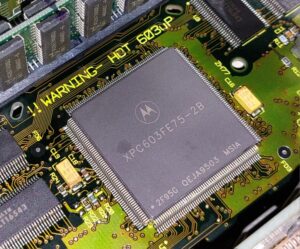
Interestingly, manufacturer data suggests that a PowerPC 603 in a similar logic board implementation to a PowerPC 601 Mac should in fact perform comparably. This is based on quoted SPECint92 and SPECfp92 scores. This implies a 75MHz 603 would out perform a 66MHz 601, if they both had 64bit memory, approximately proportionally to the difference in clock speed.
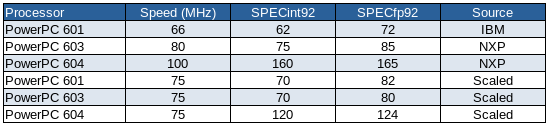
These numbers don’t appear to explain why in benchmarks, the Performa 6200 scores higher than the Power Macintosh 6100/66 in floating point, even after accounting for clock speed.
Cache and CPU Bus Speed
First and foremost, I don’t have a deep understanding of how L2 cache is implemented on early PowerPC Macs. I don’t know anything about the cache timings, so all I have done here is look at the cache chip rated speeds and compared them between different model Macs. This does not represent how quickly the cache is actually running in a machine, but assuming appropriate parts were specified, it should give a good estimate of how different machines’ cache performance compares. This is a fair assumption because SRAM for cache is expensive and so there is a strong motivation not to over-spec cache.
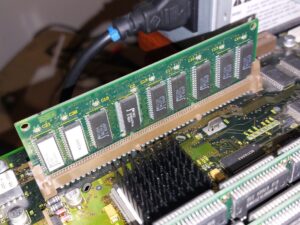
The Performa 6200 is fitted with 256k of Level 2 (L2) cache, on a SIMM shared with the ROM. This cache is on the PPC 603 bus, which is 64bits wide. Some sources state that the L2 cache is at the full CPU speed of 75MHz, but I doubt this. The Developer Note says that “The 603 bus is connected directly to the main processor and runs at the same clock rate. An external 256 KB second-level cache and 4 MB of ROM attach directly to the 603 data bus and help to optimize system performance”. This could be read to be saying that the L2 Cache and ROM are 75MHz, but Newer’s Gauge Pro software indicates that the L2 is just 37.5MHz. By extrapolating from factors such as cache spec, I believe that the Developer Note is referring to the CPU bus speed of 37.5MHz, rather than CPU core clock, but unfortunately chose slightly ambiguous language. The 603 processor is capable of using an internal bus multiplier which can be set to 1x, 2x, 3x or 4x and so in this case, would be set to 2x. Looking at the Performa 6200 cache chips themselves, they are 15ns parts, which would imply a peak speed of 66MHz (converting 15ns into a frequency by calculating the reciprocal).
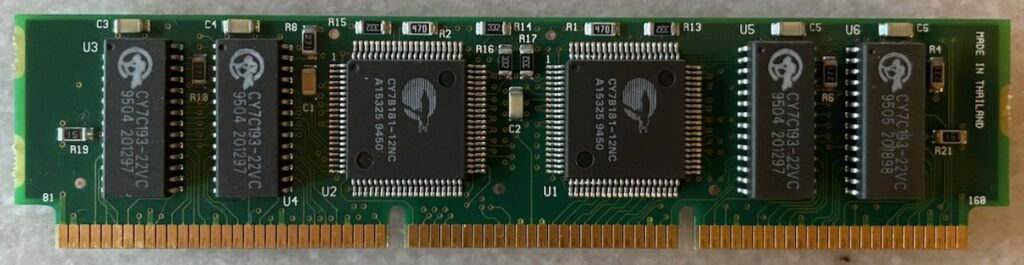
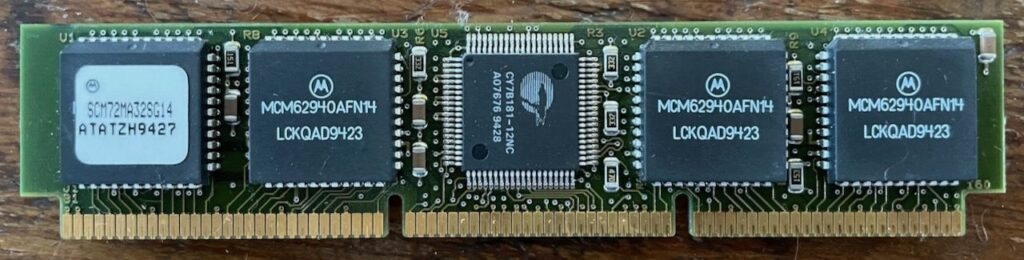
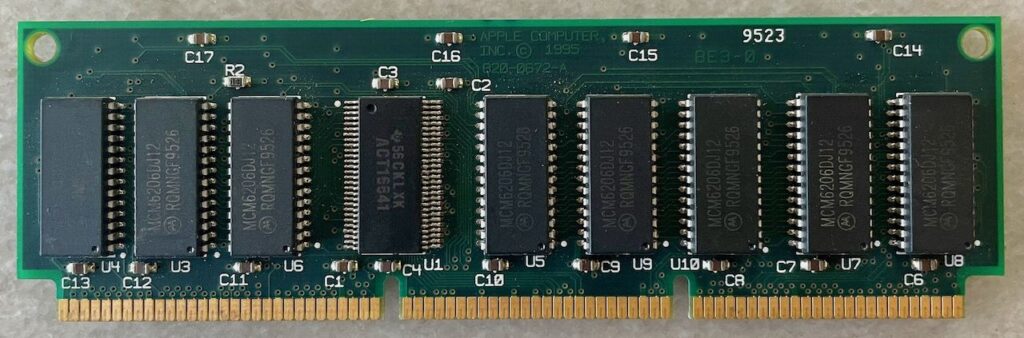
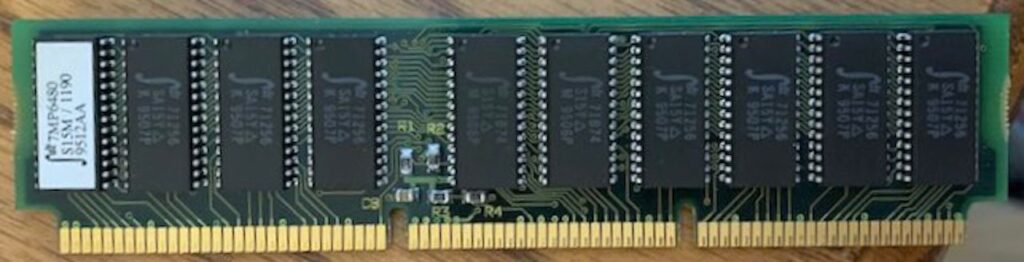
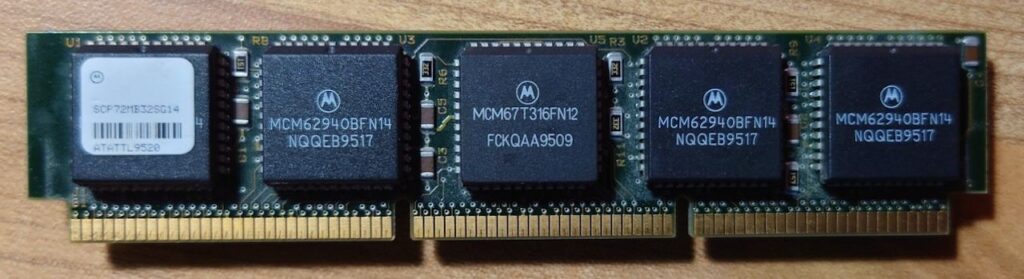
Using the linked summary of L2 Cache SIMMs for various PPC Macs posted by Fizzbinn I have reviewed what speed L2 cache Apple is believed to have fitted to various Macs during the timeframe. For Power Macintosh caches, which seem to use 14, 15 and 22ns parts, my theory is that each machine has a cache that corresponds to approximately double the bus speed. With 15ns = 66.67MHz commonly fitted to the 6100 and 14ns = 71.4MHz fitted to faster machines including the PM 8100/110 (with a 36MHz bus). The 22ns cache, identified as being from a 6100/66 is surprisingly slow, equating to 45MHz, no where near double the bus speed of any Power Macintosh. Perhaps Apple was fitting slower caches to early PM 6100s. It would be interesting to see if this makes a difference to performance, especially between 15ns and 22ns. My personal PM 6100/66 appears to have come with a 15ns L2 cache. As a quick aside, I did a quick comparison of my PM 6100/66 with 14 and 15ns cache fitted and got identical CPU benchmark scores. This suggests that both 14 and 15ns cache are “fast enough” and there is no gain in using faster chips, at least at this speed granularity.
The Performa 6200 cache with its 15ns chips does not quite meet the nominal “double the bus speed” as double would be 75MHz, and the reciprocal of 15ns is 66.67MHz. The Performa 6300, which is a minor upgrade to the 6200 fitted with a 100MHz 603e processor, was shipped with 12ns cache. This faster cache, on the computer’s 40MHz bus (using a 2.5x multiplier, as 1.5x, 2.5x and 3.5x bus multipliers were added to the 603e variant) is back in line with performance being double the bus plus a small overhead. This suggests that… perhaps Apple specified the L2 cache in the original PM 6100/60 and Performa 6200 a little below what they were willing to in other period machines.
In conclusion, I suspect that the PM 6100, 7100 and 8100 caches were specified at speeds relative to the bus speed, i.e. 30, 33.3, 36.7 and 40MHz, depending on configuration, but with some variation based on desired cache performance. I also believe the Performa 6200 cache is rated based on PPC bus speed and not CPU core clock. Ultimately, the cache chips appear to be of pretty similar speed between various machines from this era, with the exception of the 22ns PM 6100 SIMM, and so cache performance is more generally expected to be similar between the Power Macintosh 6100/66 and Performa 6200. Note that, if I remember correctly, the PM 6100/60 did not always originally ship with a L2 cache.
ROM Speed
Unusually, the ROM and Cache are both on the same SIMM for the Performa 6200 and similar machines, with TAG RAM for the cache located on the logic board itself. This presumably means these SIMMs can not be used as Cache, or ROMs in other Mac models.
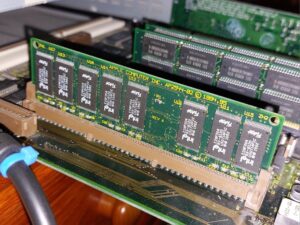
Fast ROM access is a significant advantage for “Old World” Macs as many frequently used Macintosh Toolbox functions are held in the ROM. The ROM in this Performa 6200 is built using 120ns chips. While being 64bit wide provides an advantage, presumably meaning that twice as much data is read into the CPU in a single go, 120ns in itself is not faster than late model 68k Macs, but does seem to be inline with other Power Macintosh computers from the era, such as the 6100, 7100 and 8100. This means that in terms of the performance of the connection to the CPU and the ROM chips themselves, the Performa 6200 ROM is not a bottleneck when compared to other Power Macs.
RAM Speed
RAM is on the 37.5MHz, 68040 style bus, which is only 32bits wide, unlike the Power Macintosh 6100, which implements RAM on a 64bit bus. Newer Gauge Pro reports a RAM speed of 15.2MB/s, but mis-reports it as 64bit. For reference, Gauge Pro reports a speed of 23.2MB/s for the Power Macintosh 6100/66.
Do not use virtual memory on this machine in speed critical applications (although turning it on, set to only 1MB is sometimes feasible as it allows more advanced memory management, actually freeing up more RAM, without a significant speed penalty).
While the F108 Memory Controller is known to support 128MB SIMMs (the same chip is used on the Performa 630 where it can recognise a 128MB SIMM), there appears to be an artificial limit applied to the 6200, as when I inserted 256MB of RAM, it reported only 64MB.
The 6200 does not support memory interleaving, so there is no speed benefit in using two identical SIMMs, although maximising the RAM to 64MB is sensible. Strangely, boot times give the impression that this computer may not undertake a full memory test during startup, or the memory test is somehow shorter than usual. It may be my imagination, but the computer turns the screen on (usually only done after the memory test) quite quickly after power on and the chime, regardless of how much RAM is installed.
Out of curiosity, I timed that the PM 6100 took 37 seconds to initialise video (after completing the memory test) with 264MB of RAM. Scaling for RAM speed and quantity, I would expect my Performa 6200 to take about 13.5 seconds, but it only takes 9 seconds.
It should be noted that PowerPC processors expect data to be aligned at 32bit boundaries, while 16bit alignment was the norm for 68k Macs. When data is aligned to 16bit boundaries on the Performa 6200, there will be a performance penalty as additional operations will be undertaken by the computer to manage the situation.
Graphics Performance
For a not fully understood reason, it is suspected that the graphics performance of the Performa 6200 is not only slow for a PowerPC based Mac, but is actually slower than the Performa 630 which the Performa 6200 is based on, even using the same video chip (the Valkyrie). The main exception is that the Performa 6200 is able to draw images to the screen faster, but this is countered by image translation operations being unusually slow. I don’t have an easy way of working out the cause of this discrepancy, especially considering how similar the hardware is, but given that, it would suggest that perhaps it is either to do with the Capella bridge chip, data alignment, a software reason or some other consequence of fitting a PowerPC chip into the Performa 630. An interesting comparison would be to compare Performa 6200 graphics performance with a Performa 630 fitted with a 66MHz PowerPC 601 upgrade card to see if the graphics performance is common to both, or just specific to the Performa 6200.
Another possibility might be that when increasing the bus to 37.5MHz, Apple had some unreliability with the video chip and so had to add wait states. This is vaguely possible as some people overclocking their Performa 630s to 40MHz used to have issues with their video, and have to add a heatsink to the Valkyrie chip. In some cases this apparently still wasn’t enough. See the table at the bottom of this page.
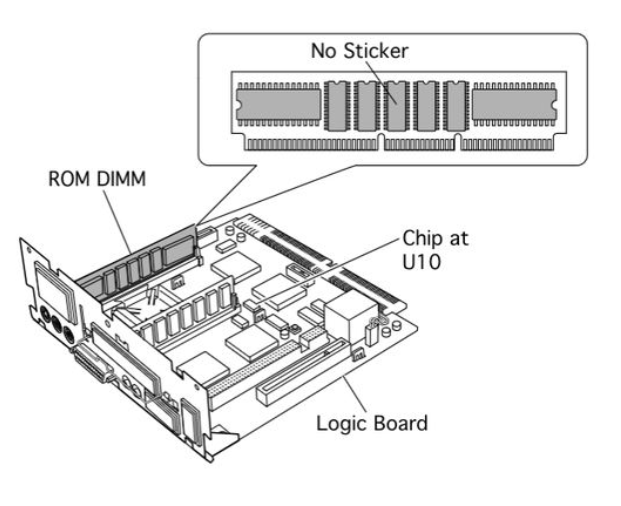
There are a couple of mentions on the internet of Apple having to update the ROM to reduce video performance of the Performa 6200, but I can find no primary evidence of this. The Service Source document mentions replacing the ROM+Cache SIMM, but in the context of a cache related issue. There is a possibility that the cache issue was fixed with a ROM update, but this is not clear in the descriptions. Additionally, there are mentions of colour tint issues on the video and random video related crashes requiring returning the computer to Apple, but the cause and fix for this are not covered in detail. I would be interested to know if anyone has first hand information regarding these issues and their fixes.
A good start might be a ROM dump from one of the “bad” ROMs that escaped the “absolutely not a recall”. If you have a ROM that matches the following description, please get in touch.
Pixel Doubling
The Performa 6200 video chip supports hardware pixel doubling in a manner that allows the 6200 to draw a 320×240 pixel image, and it be shown full screen at 640×480 with little to no CPU overhead for the scaling. Very little software took advantage of this. Known examples are, Apple’s “Apple Video Player” software, Bungie’s Marathon (by switching on “Hardware Acceleration” in Preferences) and the demo “Some Years Ago” by Noglin, which was written specifically for the 5200/6200. The functionality may also be available in QuickTime, but I haven’t investigated.
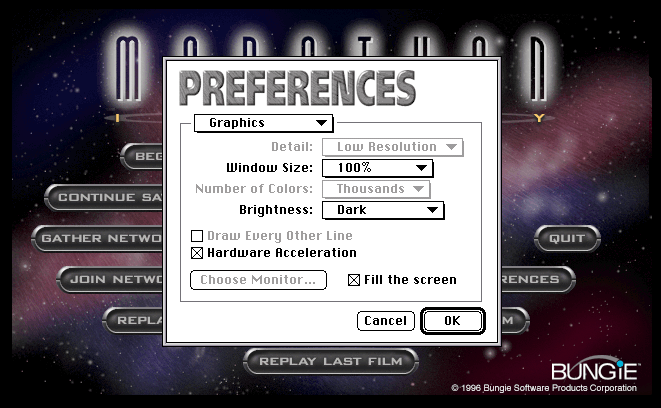
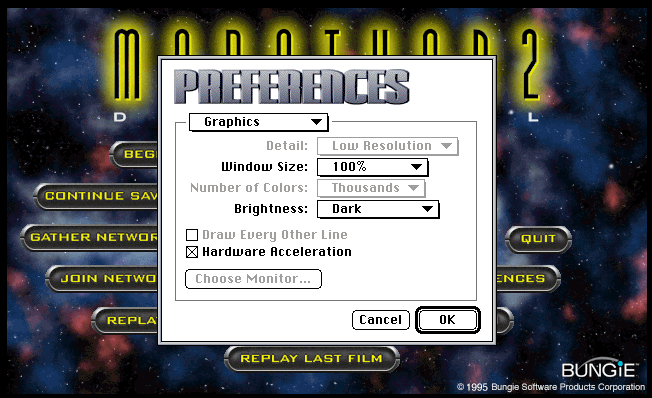
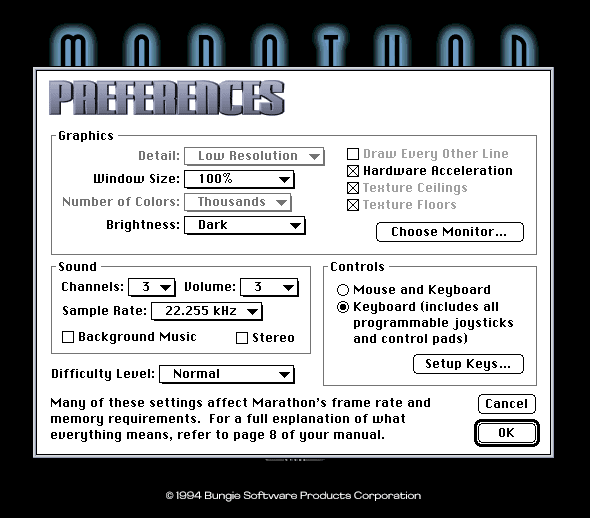
Note in early versions of the original Marathon, the option was named differently, and is only available on a reduced selection of Performa 630 or similar computers.
IDE Hard Disk
While the Performa 6200 has a very early IDE implementation for Apple, and was much maligned at the time, read and write speeds are good. I suspect the disk in this machine may have been swapped from a Performa 6300 as it is 1.2GB instead of 500MB or 1GB, and dated approximately a year after the computer was built, but even if this is part of the reason for the good performance, it shows that the IDE interface is capable of reasonable speeds. I haven’t tried a fast drive to test the limits of the interface, but am happy with the performance I’m seeing.
This said, hard disk benchmark speeds show some curious behaviour, with MacBench suggesting that the Performa 6200 hard disk performance is slower than the Performa 630 in some (but not all) tests, but also both MacBench and Norton System Info show that in some cases, hard disk performance is better when running in 68k emulation mode. This latter point suggests that the hard disk driver contains a lot of 68k code and when PPC software is running, is causing a lot of context (PPC->68k and back) switching. Context switching has a time penalty and can cause a reduction in performance. There are situations in which even though PPC code executes faster, the time cost of switching to PPC mode can outweigh the benefit.
I have not undertaken tests to verify this, but if this is the case, it may be worth identifying an alternative IDE driver that contains more, or entirely PPC code. I believe some 3rd party drivers advertised this as a feature, and also suspect that with time Apple will have optimised their newer drivers for PPC. FWBs HDT version 4.5.x might be a good solution to try.
Baseline Benchmarks
Benchmarking Software
I tend to use Norton’s System Info benchmark for three main reasons.
- We had a copy when I was growing up.
- Because I’m used to it, the numbers are more meaningful to me.
- The individual tests are clear in what they do, and are usually specific toolbox, or hardware operations.
- It allows you to run benchmarks both natively as PowerPC, or as emulated 68k. It has cats.
I did the bulk of my benchmarking for this investigation using System Info 6.0.3 from 2001. This said, when I ran two benchmarks using version 3.1.3 from 1994 (before the Performa 6200 was released) I found something curious. In version 3.1.3, the Performa 6200 scored noticeable worse than in version 6.0.3. I have no way of knowing exactly why this is. At the time version 3.1.3 the only PowerPC Macs all had PPC 601 processors, so possibly…
- Norton may have later changed weightings to better represent real world performance of the Performa 6200.
- Compilers were not optimised for the PowerPC 603 processor and so benchmarks ran less well in 3.1.3.
- Something else.
The most significant reduction in performance is when you compare with the 6100/60 between the two benchmark versions. System Info 3.1.3 was likely the release that was in the hands of journalists when they originally reviewed the Performa 6200.
With this in mind, I was looking in the Performa 6200 Developer Note and I found the linked section, and found the following extract. It seems that there were sufficient compiler optimisations required initially that Apple was directly working with the producers of development software to improve performance. The two primary issues appear to be that code which called POWER specific instructions would suffer a performance penalty as the instructions would need to be emulated (in practice this should be a rare issue, given that even though the PowerPC 601 supported the POWER instruction set, developers weren’t meant to be targeting it on the Mac), and the second issue is that certain instructions can interfere with instruction pipelining.
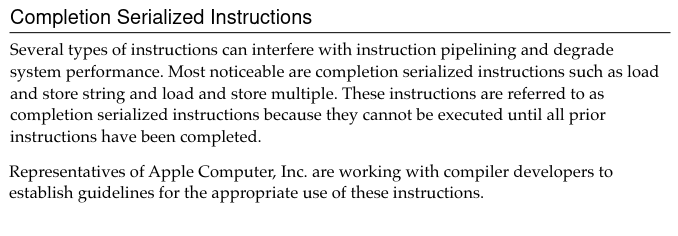
I can only assume benchmarks made with the newer version of System Info are “more accurate”, on grounds that you should be improving your product with time, but this is an interesting observation, and shows that the only real speed test is whether you are happy with performance or not.
Baseline Overall
The following shows a comparison of Norton System Info’s weighted scoring for each machine overall while running clean installs of Mac OS 7.6.1, as well as the overall scores for CPU, Video (effectively QuickDraw performance), Disk and FPU. The computers are in the recommended configuration for System Info benchmarking, with AppleTalk off, the disk cache set to 128k and the screen set to 8bit colour and 640×480 resolution. Tests were performed with the benchmark tool running both natively in PowerPC mode, as well as with 68k versions of the benchmarks running in the built in emulator.
Scores in these and following benchmarks, unless otherwise noted, are given as a percentage relative to Norton’s included score for a Power Macintosh 6100/60. For the most part I am not paying attention to the baseline 6100/60 score itself as it represents a snapshot in time with an older operating system and so is not a direct comparison with these new benchmark scores.

The last row in the table above is the PM 6100/66’s score crudely scaled from 66MHz down to the 60MHz of the inbuilt baseline. This shows that even accounting for the difference in MHz, the PM 6100/66 is disproportionately outperforming Norton’s original PM 6100/60. This is anticipated to be a mixture of the inclusion of a 256k L2 Cache, plus software optimisations resulting from a newer operating system (7.6.1 vs 7.1.2).

For clarity, the above shows the results scaled to be a percentage of the PM 6100/66 scores – for PPC and separately for emulated 68k performance. This makes it easier to compare the two systems.
Performa 6200/75 CPU, Video and Disk performance is all behind Power Macintosh 6100/66 performance. Floating Point performance is significantly ahead of the PM 6100/66 which is very interesting because that doesn’t align with expectations based on the SPECfp92 results for the two processors above in the “CPU Manufacturer Performance Data” table. As previously mentioned, the performance of a PowerPC 601 and 603 should actually be pretty close on a per-MHz basis, and so it is likely that the lower performance of the Performa is a result of the logic board design, most likely, specifically the RAM speed.
Baseline CPU
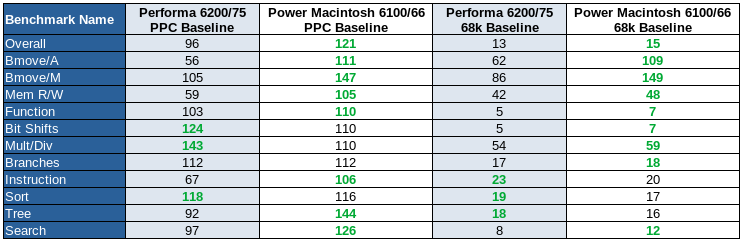
Based on in which benchmarks the Performa 6200/75 performs least well compared to the PM 6100/66, it can be seen that memory bandwidth appears to be the primary bottleneck. In particular, we can see that aligned block move performance is falling behind. On the other hand, the PPC 603 performs well when undertaking bit shifts and multiply / divide operations. The implications of this mean that it would be very interesting to compare performance with a 603 based machine utilising 64bit RAM.
Baseline Video
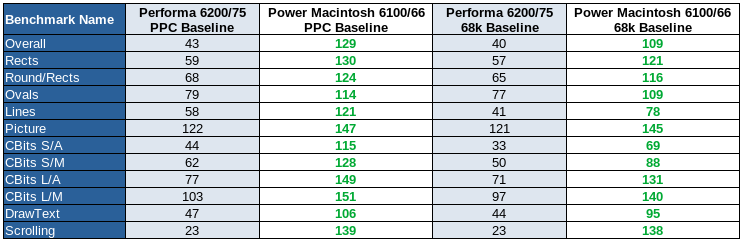
Across the board, graphics performance on my Performa 6200/75 is considerably worse than my PM 6100/66, but also many, if not all, 68040 based Macintosh computers.
This is confusing as the video chip, the Valkyrie, actually performs better when fitted to the Performa 630, even though it is connected to a slower 33MHz bus in that system. I do not have sufficient information to explain this, but would be interested in performing side by side comparisons of performance with all available Performa 6200 ROM variants, and potentially a 6300 ROM if it is capable of booting a 6200.
If anybody has any behind the scenes knowledge regarding this oddity, I’d love to know, especially if there is any way to speed up performance.
Note – I tested video performance using a PPC benchmark, but with SpeedDoubler enabled with the intent that it would give a performance improvement to any 68k code running in QuickDraw or the graphics drivers. It did not improve performance and so I can safely conclude that speed issues are unlikely to be due to emulated 68k code.
Baseline Disk
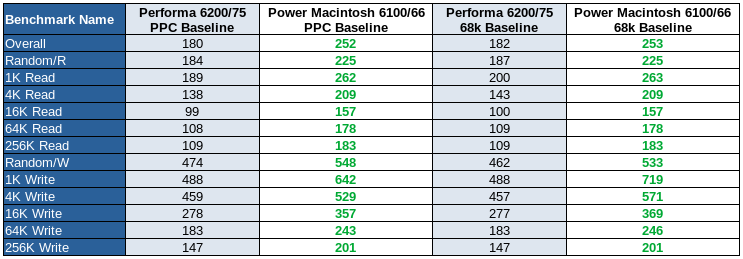
Norton System Info hard disk benchmarks showed read spreads of up to 2.5MB/s and write speeds of 2.8MB/s for 256k sequential access. These speeds are actually similar to the best speeds you tend to get with spinning hard disks of the era, and the random, 1k and other short reads and writes are faster than many similar era disks. In medium and low end SCSI Macs of the time, the SCSI bus generally has a maximum speed of 5MB/s and it is not usually possible to achieve the full 5MB/s speed.
Norton System Info shows the hard disk significantly outperforming the baseline Power Macintosh 6100, but it is likely that the PM 6100/60 Norton used was underperforming due to early disk drivers with little to no PPC optimisation.
Baseline FPU
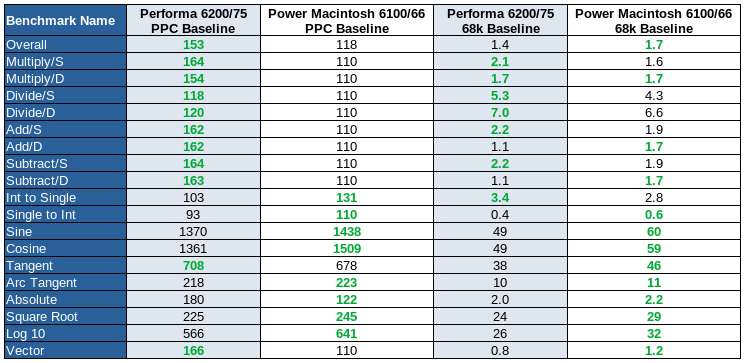
In FPU tests, the Performa 6200 is seen to be faster overall, and in the majority of individual tests, when compared to the PM 6100/66 when running PPC native code. When running emulated 68k code, the PM 6100/66 does better and achieves better scores overall and in the majority of benchmarks. Keep in mind that the 68k emulator does not emulate a 68k FPU, so this code will be emulated as if it was running on a 68k CPU.
It is not entirely applicable here, but it is interesting to note the very high scores achieved by both machines for Sine and Cosine functions. I believe this is because when the original PM 6100/60 was benchmarked by Norton for their baseline machine, the operating system (likely System 7.1.2) did not have optimisations which were later added for these functions.
These results seem to suggest that the floating point performance of the PowerPC 603 is strong compared to the PowerPC 601, which is a surprise given this is not shown in the manufacturer SpecFP92 scores in the Performance Considerations section above.
Boot Time
A basic test of the two machines booting Mac OS 7.6.1 resulted in the Performa 6200/75 taking 62 seconds to reach the desktop, while the Power Macintosh 6100/66 took 95 seconds. This includes 9 seconds (about 8.5 seconds from the chime) for the 64MB self test on the 6200 and 37 (31 seconds from the chime) seconds for the 264MB self test on the 6100.
This test isn’t very scientific and is less informative, but is included for completeness. There are a large number of variables that can influence boot time and they were not controlled in this test. The PM 6100/66 did not have a cache fitted during the test and while both operating system version numbers were the same, they were not identical installs. What this test does show is that the Performa is not unreasonably slow booting and in an arbitrary real world example, boots faster than a fairly representative PM 6100 setup.
If we discount the RAM test time, the times the two machines are 53 and 58 seconds for the Performa and the PM 6100 respectively.
Boot time will be influences by factors including installed RAM, compute speed, disk performance and what software is installed. Even how many files are on the desktop and how many Finder windows were left open. As an aside, the same test performed with a 266MHz G3 upgrade in the PM 6100 resulted in a total boot time of 87 seconds (50 seconds excluding the memory test). The G3 upgrades used in the “NuBus” PPC machines such as the PM 6100 do not take over until the processor upgrade’s extension loads, meaning the first portion of the boot process does not change.
Hardware Tweaks
Cache
I’m not aware of any larger caches available for the Performa 6200 and I don’t own any of the larger caches compatible with the PM 6100 so all tests have been undertaken using a 256k L2 cache for both machines, with the exception of a test without L2 cache undertaken on the PM 6100/66. Because the Performa’s L2 cache is on the ROM SIMM, it was not possible to remove the cache from the Performa, although given they all sold with a L2 cache fitted (unlike some PM 6100s), it wouldn’t be a reasonable test scenario anyway.

In the table above, the values have been normalised based on a score of 100 for the machines with no L2 cache fitted, independently for the PPC and emulated 68k benchmark pairs. This makes it easy to see the performance uplift from the 256k L2 cache.
It can be seen that the L2 cache has no impact on FPU performance. CPU performance when running native code increases by 7%, and by 15% for emulated 68k code. This disk performance uplift is each side of 13% which is good, but the biggest impact is an over 100% uplift in QuickDraw graphics performance.
Note that an AV card was fitted, although not in use, during the “No Cache” tests above. When an AV card is fitted it appears as an additional display regardless. I set it to the smallest resolution and black and white in an attempt to minimise the impact, but really, I would prefer to undertake some back to back tests.
Video Considerations

It should be noted that the higher resolution test performed on the PM 6100 was done with the computer booted into Mac OS 8.1, rather than 7.6.1 which was used for most tests undertaken for this analysis. Additionally, as this benchmark was undertaken for another purpose originally, I didn’t run the Disk benchmark, although comparison with other benchmarks suggest we would expect a very small reduction in disk performance, less than 1% and within the magnitude of random variation between tests.
The PM 6100 is more sensitive to resolution on built in video than the Performa 6200. Of note is the larger impact on CPU performance, although 4% isn’t in itself a large drop. It seems likely that the dedicated VRAM used by the Performa 6200 is a benefit here. The increased resolution has a more significant impact on the PM 6100/66’s graphics performance, showing a 14% reduction.
Experimentation suggests that the built-in PM 6100/66 video subsystem’s performance is actually faster than either the (“High Performance Video”) PDS card (scoring 110 for graphics, vs. 129 for built in), or the PDS AV card. The HPV cards have a 64bit bus to their video RAM, while the AV card uses a 040 style bridge chip and 32bit VRAM and so it is expected that the HPV cards would out perform the AV card. The AV card is effectively a re-implementation of the Quadra 840av video circuitry.
The AV card is technically a similar arrangement to the Performa 6200’s video system, given they are both 68040 bus connected through a bridge chip, and use dedicated VRAM. Despite this, the AV PDS card seems to demonstrates faster performance than the Peforma 6200’s graphics.
Due to what riser cards I have and the location of the connectors on the AV card, I wasn’t able to do a full comparison with the L2 cache fitted because I needed to have a G3 upgrade fitted as a riser. The G3 upgrade is not compatible with the L2 cache, even when the G3 is disabled. I was able to fit a HPV card alongside L2 by running the computer with the lid removed and the card stood vertically in the PDS slot. When I tried to do this with the AV card, the video output connector clashed with the rear case and I was unable to connect a monitor.
Software Mods
I’ve experimented with several Apple and 3rd party software packages to improve benchmark scores on the Performa 6200, both in PPC native benchmarks and in emulated 68k benchmarks.
No Extensions
Firstly, while doing my “no cache” tests, I tried booting with Extensions disable as an easy way to disable my G3 upgrade. I then re-ran the same tests having disabled the Sonnet Extension, and was surprised to find that I got different results. Apparently some of the functions that were disabled by me holding shift during startup speed up the Power Macintosh 6100, while others slow down parts of the machine. If you’re benchmarking or trying to run software as fast as possible, don’t assume disabling all Extensions is the best answer. Your exact results will depend on what software you have installed, as different installed packages consume different amounts of CPU resources in the background.

SpeedDoubler 8.1.2
SpeedDoubler from Connectix is the most critical bit of software, not just for your Performa 6200, but for any beige PowerPC Mac you plan to run 68k code on. Installing SpeedDoubler on my 6200 resulted in a 518% increase in emulated 68k CPU benchmark scores. That is not a typo. That is the difference between running 68k programs at the speed of a IIci with a 33MHz DayStar 68030 upgrade, vs. outperforming a Quadra 840av by 48%.
PowerFPU 1.3
PowerFPU is intended to both fool 68k software that requires an FPU into thinking there is one available like SoftFPU (which improves software compatibility, in particular with 3D graphics, audio and scientific software), but also map the routines to PowerPC FPU functions.
In my experiments, I found there was no significant speed gains (and in some instances, a small reduction in floating point performance), but this may be in part because I already had SpeedDoubler installed.
I would only install and use this software if I needed it for compatibility with 68k software that required a FPU.
MathLibMoto
This software library replaces Apple’s PowerPC floating point routines with equivalents from Motorola, potentially at a small sacrifice in consistency with normal Apple SANE results. I found that in Mac OS 8.6, this library made no significant difference to floating point performance, in Mac OS 7.6.1 the floating point performance was boosted to match performance under Mac OS 8.6. Additionally, I would extrapolate that if you were running even older versions of Mac OS, in particular 7.1.2 (which isn’t compatible with the Performa 6200), you would see big floating point performance speed improvements.
I recommend installing this if you are running Mac OS 8.1 or older.
Newer IDE Hard Disk Drivers
Using the hard disk driver from newer OS versions, such as the Mac OS 8.6 era, seems to improve hard disk speeds, although strangely, the best disk benchmark scores I got were while running emulated 68k benchmarks. The difference wasn’t significant so I wouldn’t be concerned about this and have just put it down to reduced context switching an 68k heavy drivers.
There may be faster, 3rd party IDE hard disk drivers available, such as those from FWB’s HDT. I have not done any testing to compare performance of alternatives. I generally prefer to keep Apple drivers when I can for compatibility.
Alternative Benchmarks
MacBench
MacBench is another benchmarking tool for classic Macs. MacBench appears to be designed to give scores more representative of real world use by using tests which run the type of operations performed in workloads such as publishing. This said, I still prefer to use System Info, because it gives a test by test breakdown of what each sub-element of the benchmark is actually doing, and how it scored (for example aligned and non-aligned memory operations), while MacBench seems to give a single overall score for each test. If I was just sharing overall scores, I would likely use MacBench, but for myself, wanting to see what a computer or CPU is good at, and what it is bad at, I prefer System Info (plus, as previously mentioned, it has cats).
I need to fetch the benchmark scores for MacBench from the Performa 6200’s hard disk.
Comparison with CPU Upgraded 68k Macs
In terms of CPU performance, the Performa 6200 is approximately (I used System Info 3.1.3 for this comparison as I had saved scores from my IIci) 25% faster than a IIci with a 66MHz DayStar Turbo 601, but is 14% slower than a Quadra 650 with a 66MHz PowerPC 601 processor upgrade (System Info 6.0.3). I’ve never fully understood why, but somehow the upgraded Quadra 650 almost matches the performance of a 6100/66 in terms of CPU benchmarks. Perhaps the benchmark is entirely contained within the upgrade card’s cache, or the performance of the interleaved 32bit RAM is close to the 6100’s 64bit RAM.
If anybody has a Performa 630 and a 66 or 100MHz PowerPC upgrade, I would be interested in seeing the results of a few specific benchmark configurations, please get in touch!
With regards to graphics performance, and specifically the raw ability of the Performa 6200 to push pixels, I decided to install the game MDK. MDK is extremely well optimised for Mac, and I have previously run it on my 66MHz PowerPC upgraded IIci. While the Performa 6200 is beneath the minimum recommended specification for the game (it recommends an 8100), it is broadly playable on a 66MHz 6100, so I have to admit what I found surprised me. As a baseline, the first two of the following images are of my IIci, running MDK on Mac OS 8.5.3. This setup is heavily bottlenecked by slow memory on a 25MHz system bus, slightly recovered by a 256k L2 cache (so the same as the Performa 6200). Performance of the upgraded IIci is significantly worse than a similar upgrade card in a Quadra 650. The second two images are of the Performa 6200. Note the frame counter (‘current(average)’) under the health HUD.
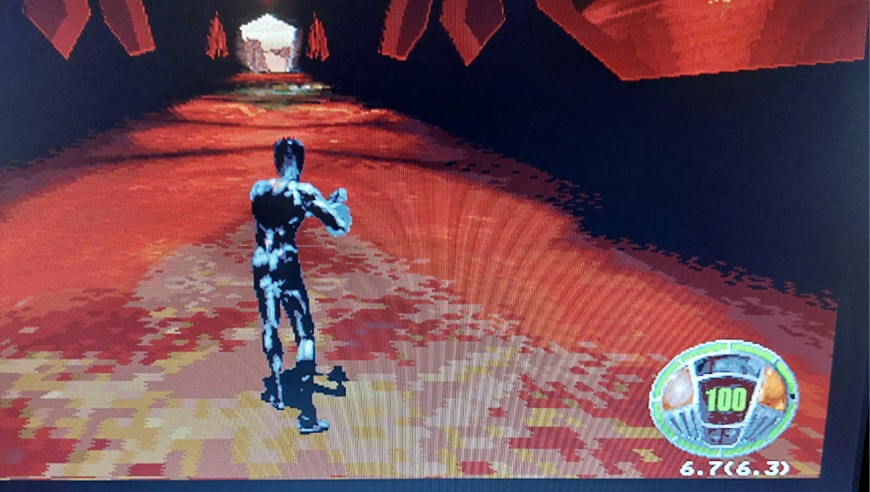
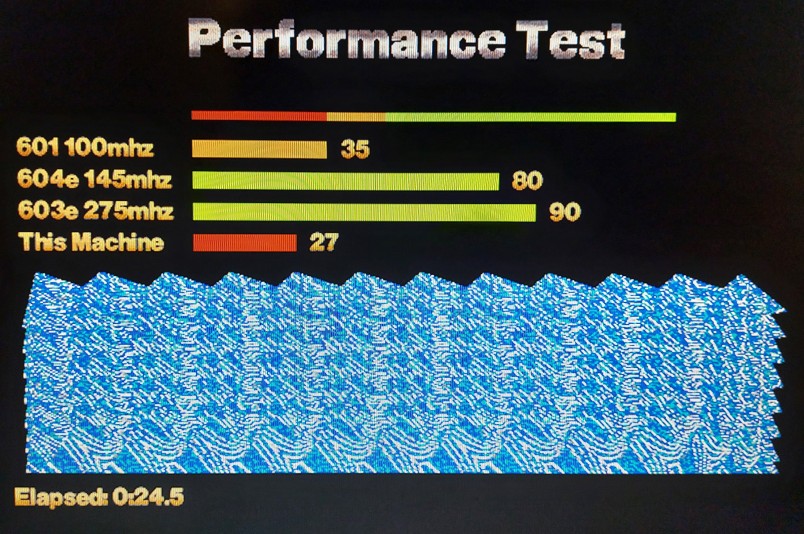
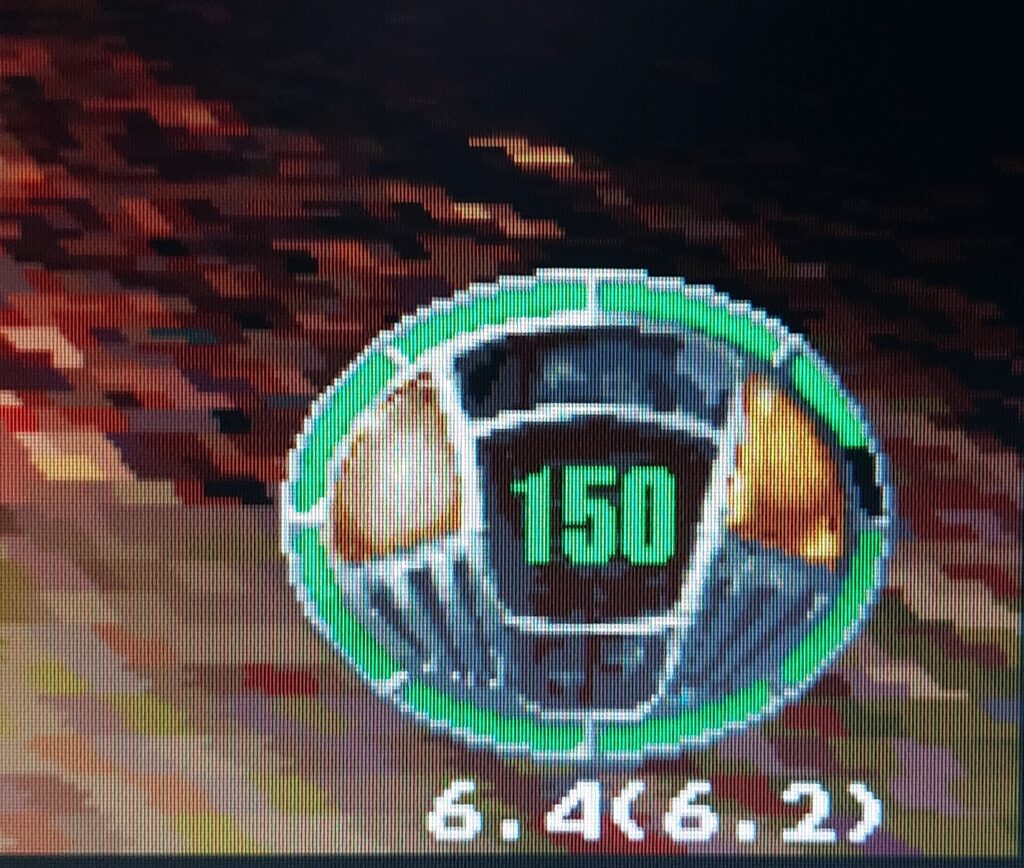
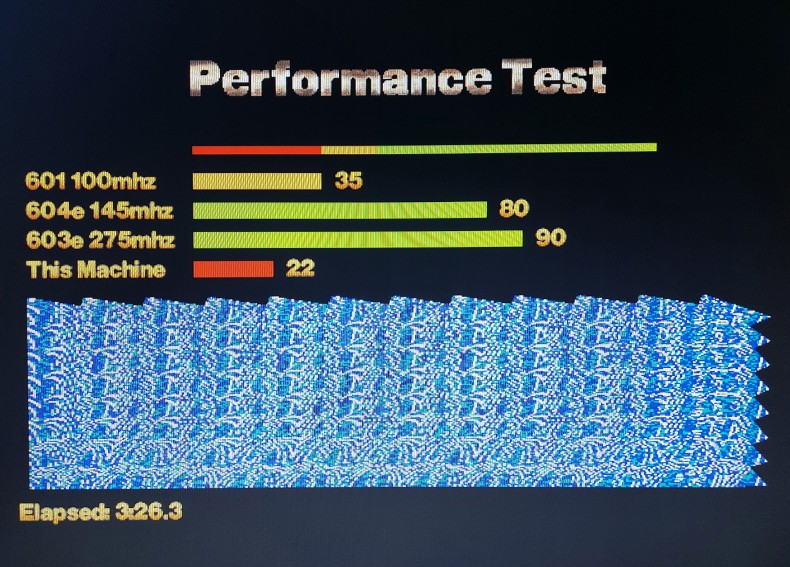
We can see that in the benchmark, the IIci was able to achieve “27”, while the Performa 6200 only achieved “22”, and frankly, this is pretty poor on the part of the Performa 6200. The video subsystem on the IIci is un-accelerated, uses main system RAM for the framebuffer and is on a 25MHz bus. This said, in the Performa’s defence, the calculated numbers don’t show the whole picture, and the user interface and load times were better / more responsive on the Performa 6200 – I suspect this is due to better CPU and hard disk performance.
Processor Upgrades
The only way, other than overclocking, of upgrading the processor on a Performa 6200 is by replacing the logic board with one from either a Performa 6300 (a straight swap, other than the 6360, which is effectively a 6400) to gain a 100 or 120MHz PowerPC 603e processor, or to fit a Performa 6400 / PM 6500 board, which requires modifications because these boards need 3.3v for PCI. Once you fitted a 6400 or 6500 board, you could fit a fairly rare Sonnet “L2” CPU upgrade into the cache slot to get PowerPC G3 performance.
By comparison, G3 processor upgrades for the Power Macintosh 6100 are fairly common in their 233 and 266MHz forms, and can be obtained for reasonable prices still, even in 2024.
A G3 upgrade gives a huge performance boost, with my PM 6100 scoring 5.6x faster in CPU benchmarks, as well as improvements in graphics (1.7x faster), disk (1.14x) and huge gains in FPU (5.21x). Additionally, measured RAM speed in my PM 6100/66 increased to 30MB/s with the G3 running, from 23.2MB/s as reported by Gague Pro previously.
Conclusions
The PowerPC 603 processor seems fine, with good CPU speed and excellent FPU performance.
RAM performance is poor compared to the PM 6100, as is expected considering the design of the computer, in particular the use of a 32bit RAM subsystem. This results in reduced overall performance compared to the PM 6100 resulting in a machine with approximately 80% of the compute power. If you use PPC native software, this is a fair performance improvement from any 68k Mac in non-graphic intensive tasks.
68k emulation is not as bad as implied by previous articles and anecdotal reports, and can additionally be vastly improved using SpeedDoubler. SpeedDoubler should be considered mandatory software for these and other PowerPC based Macintoshes running System 7.1.2 through to Mac OS 9.2.2.
IDE bus performance is appropriate for the era and hard disk performance is not significantly different to a similar age SCSI disk.
There is no significant benefit in running Mac OS 8.6, PowerFPU and MathLibMoto in terms of speed gains, although there are some benefits in specific situations. Personally I would chose 7.6.1 in most cases due to the faster boot times and smaller memory footprint.
Graphics performance on the Performa 6200 is abysmal. It is so poor, especially considering that the Performa 630 is slightly faster in many instances even though it uses the same chip, that this may be the consequence of a bug or flaw of some description. I would be interested in finding out more about why this is the case. The one area in which graphics performance is good appears to be drawing an image directly to the screen, but on the flip side, it is then particularly bad at translating an image already on the screen.
Where to get the Software
- Mac OS 7.6.1 British
- Mac OS 8.6
- SpeedDoubler 8.1.2
- MathLibMoto
- PowerFPU
- Norton System Info
- Newer Gauge Pro
- MDK
Further Work
- Complete system prices for the release period.
- Measure Quadra 650 RAM performance at 66MHz with a PPC upgrade.
- Investigate IIvx performance compared to a IIci, with and without upgrades.
- Get benchmarks for a PPC upgraded Performa 630.
- Definitively work out Performa 6200 cache speed and timings.
- PowerPC Performance from 7.1.2 to 9.1.
- Investigate whether the Performa 6200 performs a memory test.
- Is the Performa 630 really faster than the 6200 in hard disk and video tests?
- Does L2 cache chip speed rating influence benchmark scores? I.e, what happens if you benchmark a 6100 with a 22ns cache, and then again with a 14ns cache?
- Overclock the Performa 6200 to see how fast it can go.
- Compare the VRAM on a 6200 and 630 to see if they are the same speed.
- Get results for 6100/66 + AV Card + 256k Cache.
Thank you to archive.org for saving a copy of this page after WordPress randomly deleted all of the bullet lists and galleries at some point this year. Sorry I didn’t notice sooner.