Radius PrecisionColor NuBus Cards
NOTE! This information is post is currently an in progress draft. The aim here is to ensure that all data is only entered first hand by the author, and not repurposed from the internet. This is because I own a PC Pro 24xk and have seen incorrect information about this card on multiple other websites.
Note! Make sure you’re using QuickColor 3.3 if you’re using Radius Firmware and a PowerPC processor, otherwise acceleration will not work!
Data Sources
- VRAM Quantity – This is taken from photographs of cards, and counting up the VRAM
- DAC Speed – This is also taken from photographs as the RAMDAC has the speed in MHz on the chip
- Supported Resolutions – This will be taken from the DECLROMs from ROM dumps and will be the resolutions that are declared to the operating system.
- ROM Dumps – From my own cards and from cards owned by folks on 68kmla.
Notes
I previously read that the 7″ cards were the “Pro” series, but I’m weirdly finding almost all 7″ cards have no “Pro” wording anywhere on the card, including on the ROM label. The weirdest thing is that my PC PRO 24xk… does. At the moment, I have strictly based the table on the ROM label. If it turns out that 12″ cards have different specifications, I’ll update the table. I would very much like to compare the performance of a “Pro” ROM with a standard ROM for the same card and see if there are any differences.
Tabulated Radius PrecisionColor Information
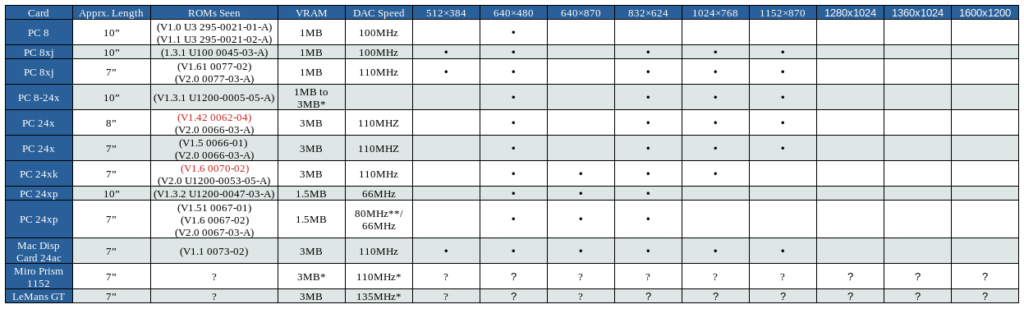
* = TBC
** = I suspect this chip is a higher specification substitution due to a shortage of 66MHz parts. The owner of the card I viewed for this could likely achieve higher resolutions with a custom ROM for this card.
? = I’ve not seen much about these cards.
ROMs
- Radius PrecisionColor 8-24X
- Radius PrecisionColor 8XJ
- Version8_24Xv1.0.2 2.0 (68k + PPC)
- Radius PrecisionColor 24XP
- Version 1.4.2
- Version 1.6
- Version 2.0 (68k + PPC)
- Radius PrecisionColor 24XK
- Version 1.6
- Version 2.0 (68k + PPC)
- Radius PrecisionColor 24X
- Version 1.4.2
- Version 2.0 (68k + PPC)
- Radius LeMans GT
- Version 1.0.1 (Assumed 68k + PPC)
- Miro Prism 1152 GX
- Version 2.0 (68k + PPC)
- Reva
- Version 2.0 (68k + PPC)
- Apple 24AC
- Version 1.1 (68k + PPC)
Multi-ROM Mod
With a small modification to most of the PrecisionColor cards, and a double sized custom ROM with two firmware versions back to back, it is possible t0o make the firmware version switchable. For example, I’ve upgraded my 24XK to have selectable 24X v2.0 and 24AC v1.1 firmware – the former is the best Radius driver compatible version, and the latter is the version compatible with the Apple drivers (which have better integration with the Monitors Control Panel). Both of these versions are PPC compatible.
To undertake the modification… Add a 10k resistor to this pin on the back of the ROM socket, taking care if your board layout isn’t identical to mine. I’ve attached one end of the resistor to the Ground side of a capacitor, and the other to Pin 2 of the socket for the ROM chip. To confirm you have the right pin, it should be connected to the middle position of J1.
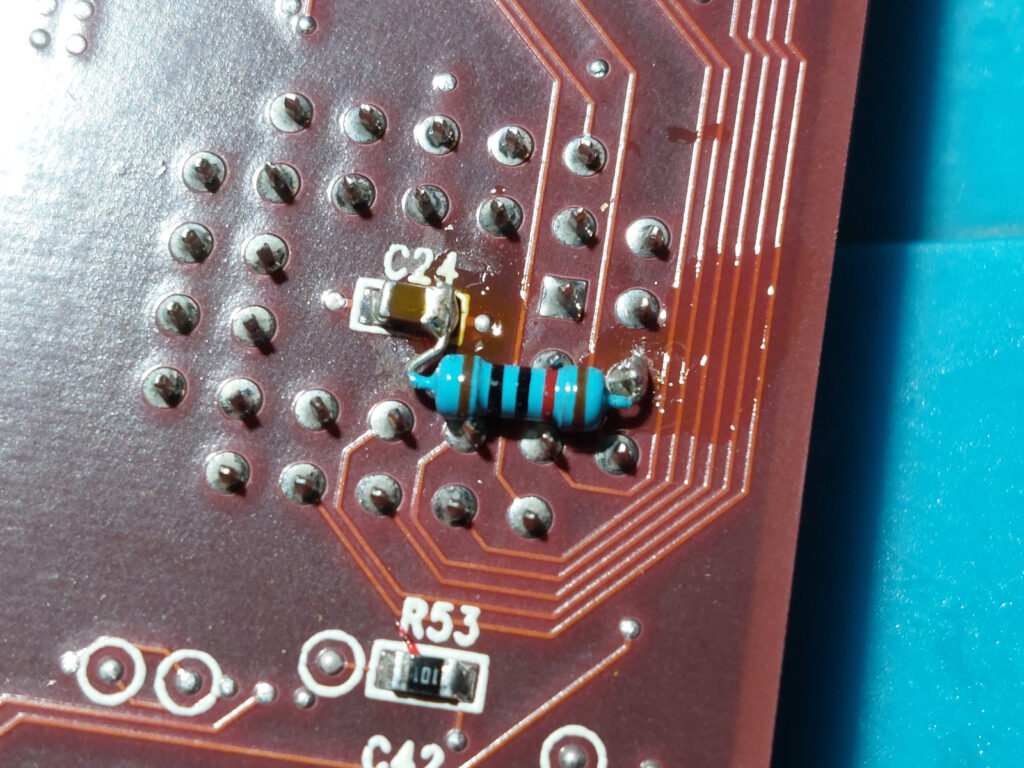
Add a 2 pin header to JP1. If there is already a header there, cut off the end pin that is not connected to 5v (pin 3 on my board). On my 24XK, this is the furthest from the Nubus connector. If there is a little wire jumper there, remove it and solder in a 2 pin header.
To select between the two ROMs, either place a removable jumper between pins 1 & 2, or remove it. To store it while removed I rotate it 90 degrees and place it on just the middle pin.
Benchmark Scores
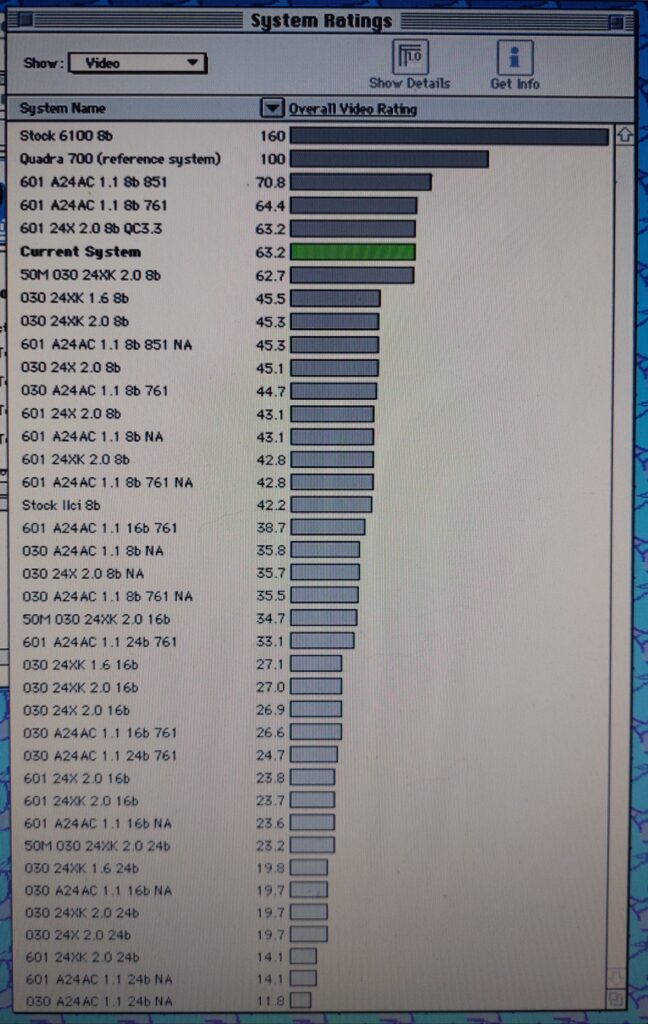
The following are a collection of benchmark scores performed by my IIci (with different upgrade cards in some instances, for example to do PPC tests). Your mileage may vary. Benchmarks were undertaken using Norton System Info’s Video benchmarks.
Ignore 601 (PowerPC) results other than the one labelled “QC3.3” for the 24X firmware as those benchmarks were undertaken using an older version of QuickColor that didn’t support acceleration on PowerPC.
Thanks To…
Special thanks to Bolle, mg.man and MJ313, who provided some of the ROM dumps. Two more are from the page https://www.wafflenet.com/bios.html, I hope they don’t mind (use my contact form to object).